





















































































































































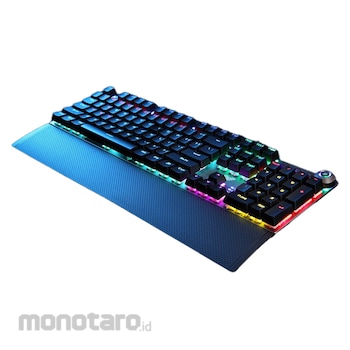


Keyboard Gaming Multimedia Mechanical AULA F2058 - Blue Switch
*Product Description :
- Dual Mode Knob Design
- You Can store desired light effect with 3 different keys
- Multimedia hot-key design
- Double injection key caps
- Designed with mechanical switches for durability and excellent hand feel
- The hand rest uses ultrasonic welding technology, and the magnetic
design is perfectly matched with the keyboard
- This keyboard wil turn off the backlight when change to the sleep mode
*Product Features :
- Knob dual mode design, default lightng mode, like 'light effect mode' and 'multimedia mode'
- Operation method : Hold for 3 seconds to switch between multimedia mode and light effect mode
- FN+ESC : hold these two key for 1~2 seconds to restore factory defaults
*Multimedia mode :
- In multimedia mode : Knob light is off to multimedia mode.
Click the button to mute the function.
- In the multimedia mode : Rotate the knob antoclockwise to decrease volume.
Rotate the knob clockwise to increase volume.
*Light effect mode :
1. In the light effect mode :
- The rotation indicator lights up to the lighting mode.
- Click the button to witch the light effect mode and store up to 19 lighting effects.
2. In the light effect mode :
- Rotate the knob anticlockwise to decrease the brightness of the light
- Rotate the knob clockwise to increase the brightness of the light
Aula Gaming Keyboard Mechanical F2058 1unit
Rp429.900
Persediaan
Spesifikasi Produk
| Model Number | F2058 |
|---|---|
| Unit | 1unit |
| Dimensions (mm) | 435x123x36 |
| Keys | 108 |
| Rated Voltage (V) | DC 5 |
| Rated Current (mA) | <200 |
| Key stroke (mm) | 4.0 |
| OS Support | Vista / Windows 7, 8, 10 / Mac |
| Keys Lifetime | 50 million clicks |
| Connectivity | Wired USB |
| Hand Tray Size (mm) | 435x68x14.5 |
| Berat (Kg) | 2.0 |
| Tanggal Produk Terdaftar | 07 July 2022 |
| Terakhir Diperbaharui | 27 May 2025 |
Informasi Produk
Description
GRATIS ONGKIR* ke Jabodetabek, Banten,
Jabar & Jatim dengan minimum total pesanan Rp200.000 saat checkout. Lihat selengkapnya
Jabar & Jatim dengan minimum total pesanan Rp200.000 saat checkout. Lihat selengkapnya
Pilih jenis produk yang diinginkan
| Nomor SKU | Model Number | Masa Persiapan Barang | Harga | Jumlah |
|---|---|---|---|---|
| Loading... | ||||
Ulasan Produk

Tidak ada ulasan


 Buka WhatsApp