





















































































































































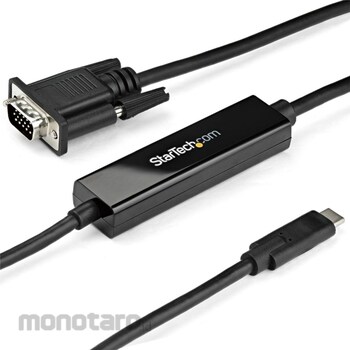

Digital-to-analog conversion: Connect to one VGA display with a USB-C (DP 1.2 Alt mode HBR2) compatible active adapter cable. Supports 1920x1200 / 1920x1080 60Hz. Supports EDID & DDC pass-through Adapter built-in: Adapter cable that minimizes signal loss and failure points. Reduces signal loss and failure points for neat wiring PC compatibility: Dell XPS, Precision & Latitude, Lenovo ThinkPad X1 Carbon Extreme, Surface Pro 7 / Laptop 3 / Book 3, MacBook Pro, iPad Pro, TB3 MacBook Air, HP EliteBook, Specter & ZBook, Chromebook
Display compatibility: Verification of performance on 1080p compatible display devices of various brands (Dell / Samsung / Asus / Acer monitors, Sony / Christie / LG / NEC / Epson projectors, etc.)
Easy installation: Works with driver-free plug and play (macOS / iPadOS / Windows 10 / Linux / Chrome OS / Android). Validate compatibility with USB Type C DP Alt mode / TB3 devices
Connect a USB-C compatible computer to a VGA projector or display installed in a classroom, auditorium, conference room, etc. Use it on a hot desk in a home workstation or office to ensure compatibility between a USB-C personal computer and a VGA display.
* To use this adapter, it is necessary to support DisplayPort (DP Alt mode) via the USB-C port.
StarTech.com USB-C-VGA cable / 1080p / active conversion / Thunderbolt 3 compatible / black
#Grup produk P113677827
Spesifikasi
| Chipset | NXP-PTN5100 |
|---|---|
| Color | Black, [Accent color] Black |
| Connector A | USB Type-C [24 pin] DisplayPort Alt mode |
| Connector B | VGA (High Density D-Sub) [15 Pin] |
| Connector Shape | USB Type-C (video transmission) male - VGA (high density D-Sub) [15 pin] male |
| Height (mm) | 15 |
| Humidity (% RH) | 5~90 |
| Input | (AV)USB Type-C |
| Male Mounting | USB Type-C (video transmission), VGA (high density D-Sub) [15 pins] |
| Maximum Resolution | [Analog] 1920 x 1200 / 1080p |
| Number of Ports | 1 |
| Operating Temperature (°C) | 0~70 |
| Output | (AV)VGA |
| Specification | [Wide screen support] available |
| Storage Temperature (°C) | -10~80 |
| Supported Resolution | 1024 x 768, 1280 x 720 (high definition 720p), 1920 x 1080 (high definition 1080p), 1920 x 1200 |
Pilih jenis produk yang diinginkan
| Nomor SKU | Model Number | Masa Persiapan Barang | Harga | Jumlah |
|---|---|---|---|---|
| Loading... | ||||
Informasi Produk
Description
Warning
* To use this adapter, it is necessary to support DisplayPort (DP Alt mode) via the USB-C port.Feature
Digital-to-analog conversion: Connect to one VGA display with a USB-C (DP 1.2 Alt mode HBR2) compatible active adapter cable. Supports 1920x1200 / 1920x1080 60Hz. Supports EDID & DDC pass-through Adapter built-in: Adapter cable that minimizes signal loss and failure points. Reduces signal loss and failure points for neat wiring PC compatibility: Dell XPS, Precision & Latitude, Lenovo ThinkPad X1 Carbon Extreme, Surface Pro 7 / Laptop 3 / Book 3, MacBook Pro, iPad Pro, TB3 MacBook Air, HP EliteBook, Specter & ZBook, ChromebookDisplay compatibility: Verification of performance on 1080p compatible display devices of various brands (Dell / Samsung / Asus / Acer monitors, Sony / Christie / LG / NEC / Epson projectors, etc.)
Easy installation: Works with driver-free plug and play (macOS / iPadOS / Windows 10 / Linux / Chrome OS / Android). Validate compatibility with USB Type C DP Alt mode / TB3 devices
Use
Connect a USB-C compatible computer to a VGA projector or display installed in a classroom, auditorium, conference room, etc. Use it on a hot desk in a home workstation or office to ensure compatibility between a USB-C personal computer and a VGA display.Ulasan Produk

Tidak ada ulasan


 Buka WhatsApp