





















































































































































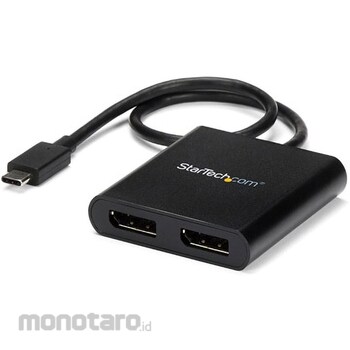

Multi-monitor configuration: USB Type-C to dual DisplayPort adapter/splitter that allows you to connect up to two 4K 30Hz or two 1080p 60Hz displays via your Windows laptop's DP Alt mode USB-C port. Supports TB3/TB4/USB4. No need to install non-macOS drivers or software: Work more efficiently by adding two displays in extended or duplicate mode to your Windows laptop. Integrated or discrete GPU (Intel/AMD/Nvidia) capability for high-performance graphics with minimal CPU usage Hardware compatibility: Your host system supports DP Alt Mode 1.2 / HBR2 / MST Please make sure it is compatible. Also, check the number of displays supported by the GPU installed in the host system. Some GPU chips, such as Intel HD Graphics, support up to 3 displays.
Long Cable: USB-C to Dual Monitor DisplayPort Adapter with 30cm Integrated Cable. Reduce strain on ports on 2-in-1s like Surface Pro 7, HP Elite x2 and laptops on risers. Perfect for the office, home office, shared workspace, on-the-go, and more
The StarTech.com Advantage: Connectivity Tool for Internal Help Desks and Support Teams Includes Windows Layout Utility (downloadable, available in English only). When reconnecting the adapter (disconnecting and reconnecting an external monitor), Windows application layout is restored to user-configured window layout instead of default.
Add an external display to your USB-C device Create websites and other data on one screen and create documents on the other
Connect two high-definition displays to a USB-C device that supports DP alt mode and use it as a workstation
DisplayPort Create a panoramic video wall with digital signage Edit images, videos, and audio clips on two screens with free resolution and display orientation Display large tables and worksheets across two displays for horizontal scrolling Work without
* In order to output separately on multiple displays, the GPU must support DisplayPort 1.2 (compatible with MST and HBR2).
StarTech.com USB-C to 2x DisplayPort 1.2 Conversion Adapter/4K30Hz/Dual Monitor/30cm Integrated Cable/Windows Only/MST Hub/Multi-Monitor DisplayPort Splitter/Type-C Display Adapter
#Grup produk P113676642
Spesifikasi
| Audio Function | Yes |
|---|---|
| Chipset | MegaChips-STDP4320,VIA/VLI-VL100 |
| Color | Black |
| Compatibility | (OS)MicrosoftWindows10,8/8.1,7 |
| Connector A | USB-C (24 pin) DisplayPortAlt mode |
| Connector B | DisplayPort (20 pin) |
| Height (mm) | 14 |
| Humidity (% RH) | 50~90 |
| Length (mm) | 62 |
| Mass (g) | 44 |
| Maximum Resolution | [Digital] 3840 x 2160 / 30hz |
| Number of Ports | 2 |
| Operating Temperature (°C) | 5~35 |
| Output | (AV)DisplayPort |
| Power Supply | USB power supply |
| Set Contents | MST hub, quick start guide |
| Specification | [Wide screen support] available |
| Storage Temperature (°C) | -20~60 |
| USB Port Number | 2 |
| Width (mm) | 58 |
Pilih jenis produk yang diinginkan
| Nomor SKU | Model Number | Masa Persiapan Barang | Harga | Jumlah |
|---|---|---|---|---|
| Loading... | ||||
Informasi Produk
Description
Warning
* In order to output separately on multiple displays, the GPU must support DisplayPort 1.2 (compatible with MST and HBR2).Feature
Multi-monitor configuration: USB Type-C to dual DisplayPort adapter/splitter that allows you to connect up to two 4K 30Hz or two 1080p 60Hz displays via your Windows laptop's DP Alt mode USB-C port. Supports TB3/TB4/USB4. No need to install non-macOS drivers or software: Work more efficiently by adding two displays in extended or duplicate mode to your Windows laptop. Integrated or discrete GPU (Intel/AMD/Nvidia) capability for high-performance graphics with minimal CPU usage Hardware compatibility: Your host system supports DP Alt Mode 1.2 / HBR2 / MST Please make sure it is compatible. Also, check the number of displays supported by the GPU installed in the host system. Some GPU chips, such as Intel HD Graphics, support up to 3 displays.Long Cable: USB-C to Dual Monitor DisplayPort Adapter with 30cm Integrated Cable. Reduce strain on ports on 2-in-1s like Surface Pro 7, HP Elite x2 and laptops on risers. Perfect for the office, home office, shared workspace, on-the-go, and more
The StarTech.com Advantage: Connectivity Tool for Internal Help Desks and Support Teams Includes Windows Layout Utility (downloadable, available in English only). When reconnecting the adapter (disconnecting and reconnecting an external monitor), Windows application layout is restored to user-configured window layout instead of default.
Use
Add an external display to your USB-C device Create websites and other data on one screen and create documents on the otherConnect two high-definition displays to a USB-C device that supports DP alt mode and use it as a workstation
DisplayPort Create a panoramic video wall with digital signage Edit images, videos, and audio clips on two screens with free resolution and display orientation Display large tables and worksheets across two displays for horizontal scrolling Work without
Ulasan Produk

Tidak ada ulasan


 Buka WhatsApp