





















































































































































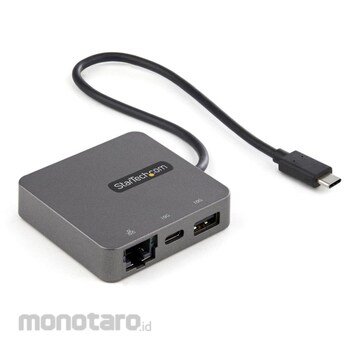

Required port features: Equipped with 4K/30Hz HDMI or 1080p VGA video output port, 1x USB-A & 1x USB-C (USB 3.1 Gen 2 10Gbps), and Gigabit wired LAN port. Backward compatible with USB 3.1 Gen 1 laptops Long host cable: Easy to set up and connects to a connector on two-in-one devices (Surface Pro 7, iPad Pro, iPhone 15 (Plus/Pro/Max) and later, HP Elite X2, etc.) 29cm host cable reduces the load. Convenient for connecting to laptops (such as Lenovo X1 Carbon) mounted on a laptop stand Ideal for presentations: Compatible with both VGA and HDMI, you can connect your USB-C equipped laptop/tablet/smartphone to a projector in a conference room or classroom Wide OS compatibility and easy setup: Supports automatic driver installation for various OS (Windows, macOS, Chrome OS, iPadOS, Android)
StarTech.com Advantage: Connectivity tools for IT pros and IT help desk teams, including MAC address pass-through for network security, WiFi auto-switching for improved network performance, USB event monitoring, window layout, and more. Available for download from HP (available only in English)
Use the USB-C port of a laptop / tablet to connect to HDMI, Gigabit Ethernet, etc. Connect a laptop to a projector to display powerful content. Ideal for watching multimedia at home, giving presentations in conference rooms and classrooms When traveling, use the hotel's built-in HDMI port TV as an external display
Connect your laptop to a Gigabit-enabled wired LAN where Wi-Fi &; reg; cannot be used
StarTech.com USB-C Multiport Adapter - USB 3.1 Gen 2 Type-C Mini Dock - USB-C to 4K HDMI or 1080p VGA Video - 10Gbps USB-A USB-C, GbE - Portable Travel Laptop Dock - Works with Thunderbolt 3
#Grup produk P113676509
Spesifikasi
| Cable Length (cm) | 25 |
|---|---|
| Color | Black |
| Connecting Terminal | USB-C (supports USB 3.2 Gen 2) |
| Connector Shape | 1x HDMI, 1x VGA, 1x USB-A (USB 3.2 Gen 2 compatible), 1x USB-C (USB 3.2 Gen 2 compatible) |
| Height (mm) | 15 |
| Humidity (% RH) | 90 or less (no condensation) |
| Length (mm) | 360 |
| MTBF (hour) | 49444 |
| Mass (g) | 54 |
| Maximum Resolution | [Analog] 2048 x 1280p @ 30Hz (VGA), [Digital] 3840 x 2160p @ 30Hz (HDMI) Low resolution is also supported. |
| Operating Temperature (°C) | 0~60 |
| Power Supply | Bus power |
| Product Width (mm) | 61 |
| Set Contents | 1 +-+ USB-C connection multi-adapter + HDMI / VGA + 10GbE, 1 +-+ quick start + guide |
| Storage Temperature (°C) | -20~60 |
| Supported OS | Windows 7/8/8.1/10/11,macOS 10.12 - 10.15/11.0/12.0/13.0,Chrome OS,Android |
| Transmission Speed (Gbps) | Maximum 5 (USB 3.0), maximum 2 (Ethernet, full duplex) |
| USB type | USB3.2 Gen 2 (10 Gbps) |
Pilih jenis produk yang diinginkan
| Nomor SKU | Model Number | Masa Persiapan Barang | Harga | Jumlah |
|---|---|---|---|---|
| Loading... | ||||
Informasi Produk
Description
Feature
Required port features: Equipped with 4K/30Hz HDMI or 1080p VGA video output port, 1x USB-A & 1x USB-C (USB 3.1 Gen 2 10Gbps), and Gigabit wired LAN port. Backward compatible with USB 3.1 Gen 1 laptops Long host cable: Easy to set up and connects to a connector on two-in-one devices (Surface Pro 7, iPad Pro, iPhone 15 (Plus/Pro/Max) and later, HP Elite X2, etc.) 29cm host cable reduces the load. Convenient for connecting to laptops (such as Lenovo X1 Carbon) mounted on a laptop stand Ideal for presentations: Compatible with both VGA and HDMI, you can connect your USB-C equipped laptop/tablet/smartphone to a projector in a conference room or classroom Wide OS compatibility and easy setup: Supports automatic driver installation for various OS (Windows, macOS, Chrome OS, iPadOS, Android)StarTech.com Advantage: Connectivity tools for IT pros and IT help desk teams, including MAC address pass-through for network security, WiFi auto-switching for improved network performance, USB event monitoring, window layout, and more. Available for download from HP (available only in English)
Use
Use the USB-C port of a laptop / tablet to connect to HDMI, Gigabit Ethernet, etc. Connect a laptop to a projector to display powerful content. Ideal for watching multimedia at home, giving presentations in conference rooms and classrooms When traveling, use the hotel's built-in HDMI port TV as an external displayConnect your laptop to a Gigabit-enabled wired LAN where Wi-Fi &; reg; cannot be used
Ulasan Produk

Tidak ada ulasan


 Buka WhatsApp