





















































































































































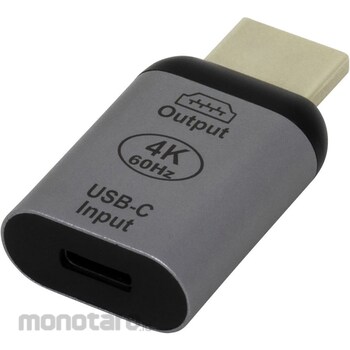

Allows you to connect a computer equipped with USB Type-C (USB-C) to the HDMI port of a display using a Type-C cable. (HDMI output cannot be converted to USB Type-C)
Outputs video and audio from your computer to an HDMI-equipped display/TV, etc.
It is suitable for making presentations using a Type-C equipped laptop on an HDMI equipped TV, etc.
The built-in chipset converts the USB Type-C output to HDMI.
Supports high resolutions up to 4K UHD (4K (2160p), 3840 x 2160) / 60Hz.
This small, cable-free adapter is easy to carry around.
It is ideal for using Type-C cables universally and using adapters to support other connections.
Since this is an adapter that connects to the display, it keeps the area around your computer's ports neat and tidy.
*The product is a generic product, and we do not guarantee that it will work in all combinations.
*Depending on the usage environment, there is a risk of interference with connectors around the port.
*The display resolution depends on the connected computer, TV/display, and cable.
*HDMI output cannot be converted to USB Type-C.
*Does not support HDR.
*To output video from Type-C, the Type-C port must support DisplayPort Alt mode.
*Please use a USB Type-C cable that supports DisplayPort Alt mode.
Ainex USB Type-C conversion adapter C to HDMI
#Grup produk P113671285
Spesifikasi
| Color | Gray |
|---|---|
| Connector Shape | PC side: USB Type-C female, TV/display side: HDMI male (Type A 19 pin) |
| Dimensions, Width W x Depth D x Height H (mm) | 24x43x10 (D33mm excluding connector) |
| Supported Resolution | 3840x2160/2560x1440/1920x1200/1920x1080/1600x1200/1280x1024/1280x960/1280x800/1280x768/1280x720/1024x768/800x600 |
Pilih jenis produk yang diinginkan
| Nomor SKU | Model Number | Masa Persiapan Barang | Harga | Jumlah |
|---|---|---|---|---|
| Loading... | ||||
Informasi Produk
Description
Warning
*The product is a generic product, and we do not guarantee that it will work in all combinations.*Depending on the usage environment, there is a risk of interference with connectors around the port.
*The display resolution depends on the connected computer, TV/display, and cable.
*HDMI output cannot be converted to USB Type-C.
*Does not support HDR.
*To output video from Type-C, the Type-C port must support DisplayPort Alt mode.
*Please use a USB Type-C cable that supports DisplayPort Alt mode.
Feature
Allows you to connect a computer equipped with USB Type-C (USB-C) to the HDMI port of a display using a Type-C cable. (HDMI output cannot be converted to USB Type-C)Outputs video and audio from your computer to an HDMI-equipped display/TV, etc.
It is suitable for making presentations using a Type-C equipped laptop on an HDMI equipped TV, etc.
The built-in chipset converts the USB Type-C output to HDMI.
Supports high resolutions up to 4K UHD (4K (2160p), 3840 x 2160) / 60Hz.
This small, cable-free adapter is easy to carry around.
It is ideal for using Type-C cables universally and using adapters to support other connections.
Since this is an adapter that connects to the display, it keeps the area around your computer's ports neat and tidy.
Ulasan Produk

Tidak ada ulasan


 Buka WhatsApp