





















































































































































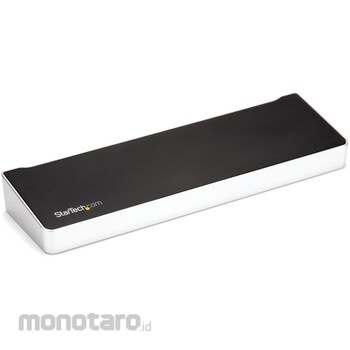

Full-featured dock with three video outputs (2x DP & 1x HDMI), 100W Power Delivery, 4x USB-A & 1x USB-C 5Gbps hub, Gigabit Ethernet, 1x headset port, 1x speaker/mic audio port, Kensington slot for security lock, 1m USB-C cable, and DisplayLink Update Utility included.
Triple Display with MacBook Air: Connect up to three external displays to your Apple MacBook Air/Pro (based on M-series) laptop, even if only one external display is supported. Supports dual or triple display connections using DisplayPort or HDMI ports. Note: Driver installation required for Windows and macOS.
Wide compatibility: USB-IF, VESA, and DisplayLink compliant. This docking station provides optimal performance for a variety of laptops running Windows, macOS, and Ubuntu, as well as Chromebooks running ChromeOS, ensuring a smooth deployment.
Universal USB-C and USB-A functionality: Connect to a laptop with a USB 3.0 Type-A port using a separately sold USB-C to USB-A adapter cable (USB315AC1M). Note: When connected to a USB-A port, dual monitors are only supported and Power Delivery is not available for laptop charging.
The StarTech.com Advantage: Downloadable connectivity tools for IT and help desk teams, including network MAC address pass-through for enhanced network security, WiFi auto-switching for improved network performance, USB event monitoring, and windows layout (available in English only)
Ideal for 4K video editing and high-resolution graphic applications Process multiple documents at the same time with office applications Check multiple monitor screens at once at a financial institution High-power Power Delivery (100W) supports laptops with high power consumption
* Not all USB-C ports fully support the functions of the USB Type-C standard. Make sure your laptop's USB-C port supports USB PD 2.0 and DP alt mode.
* All three ports support 4K resolution. To get 4Kx2K resolution, you need a 4K-enabled display.
* Performance may be limited when connecting to a USB 2.0 host port or using a USB 2.0 host connection cable (USB 3.0 host cable included).
* USB 3.0 is sometimes called USB 3.1 Gen 1, which is a standard that supports speeds of up to 5 Gbps.
* 5K resolution is supported by connecting two DisplayPort video ports to one 5K display. A 5K-capable display is required to achieve 5K (5120 x 2880 resolution) resolution.
* This dock connects to the USB-C port of your laptop. You can also connect to a USB-A port using the USB-C-A cable (sold separately). However, this configuration supports dual display and does not supply power to the laptop via USB-A.
StarTech.com Docking station/USB-C connection/3 screen output/4K HDMI & DP/100W PD/USB hub/Wired LAN/Win Mac/Multi-function Type-C hub
#Grup produk P113588383
Spesifikasi
| Cable Length (cm) | 100 |
|---|---|
| Color | Black, silver |
| Connecting Terminal | USB-C (supports USB 3.2 Gen 1) |
| Supported OS | Windows 7/8/8.1/10/11,macOS 10.9 - 10.12/10.14 - 10.15/11.0/12.0/13.0,Ubuntu 18.04/20.04,Chrome OS v55+ |
| USB type | USB3.2 Gen 1 (5 Gbps) |
Pilih jenis produk yang diinginkan
| Nomor SKU | Model Number | Masa Persiapan Barang | Harga | Jumlah |
|---|---|---|---|---|
| Loading... | ||||
Informasi Produk
Description
Warning
* Not all USB-C ports fully support the functions of the USB Type-C standard. Make sure your laptop's USB-C port supports USB PD 2.0 and DP alt mode.* All three ports support 4K resolution. To get 4Kx2K resolution, you need a 4K-enabled display.
* Performance may be limited when connecting to a USB 2.0 host port or using a USB 2.0 host connection cable (USB 3.0 host cable included).
* USB 3.0 is sometimes called USB 3.1 Gen 1, which is a standard that supports speeds of up to 5 Gbps.
* 5K resolution is supported by connecting two DisplayPort video ports to one 5K display. A 5K-capable display is required to achieve 5K (5120 x 2880 resolution) resolution.
* This dock connects to the USB-C port of your laptop. You can also connect to a USB-A port using the USB-C-A cable (sold separately). However, this configuration supports dual display and does not supply power to the laptop via USB-A.
Feature
Full-featured dock with three video outputs (2x DP & 1x HDMI), 100W Power Delivery, 4x USB-A & 1x USB-C 5Gbps hub, Gigabit Ethernet, 1x headset port, 1x speaker/mic audio port, Kensington slot for security lock, 1m USB-C cable, and DisplayLink Update Utility included.Triple Display with MacBook Air: Connect up to three external displays to your Apple MacBook Air/Pro (based on M-series) laptop, even if only one external display is supported. Supports dual or triple display connections using DisplayPort or HDMI ports. Note: Driver installation required for Windows and macOS.
Wide compatibility: USB-IF, VESA, and DisplayLink compliant. This docking station provides optimal performance for a variety of laptops running Windows, macOS, and Ubuntu, as well as Chromebooks running ChromeOS, ensuring a smooth deployment.
Universal USB-C and USB-A functionality: Connect to a laptop with a USB 3.0 Type-A port using a separately sold USB-C to USB-A adapter cable (USB315AC1M). Note: When connected to a USB-A port, dual monitors are only supported and Power Delivery is not available for laptop charging.
The StarTech.com Advantage: Downloadable connectivity tools for IT and help desk teams, including network MAC address pass-through for enhanced network security, WiFi auto-switching for improved network performance, USB event monitoring, and windows layout (available in English only)
Use
Ideal for 4K video editing and high-resolution graphic applications Process multiple documents at the same time with office applications Check multiple monitor screens at once at a financial institution High-power Power Delivery (100W) supports laptops with high power consumptionUlasan Produk

Tidak ada ulasan


 Buka WhatsApp