





















































































































































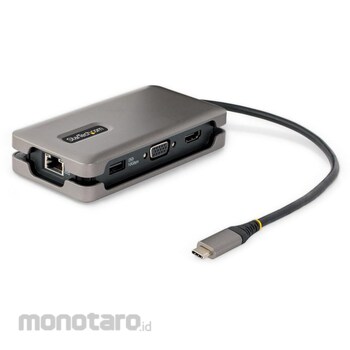

USB-C mini docking station: HDMI 2.0b (4K60Hz) and VGA (1080p) ports for connection to UHD-enabled monitors and displays, 100W Power Delivery passthrough (USB PD 3.0), 3-port USB 3.2 (10Gbps) hub ( 2x USB-A, 1x USB-C) and Gigabit Ethernet ports (PXE boot/WoL) Easy-to-manage integrated cable: A clever design that wraps around the cable to prevent tangling. Unlike adapters with short host cables, it has a long reach that won't strain your laptop's USB-C port. Comes with a 32cm integrated cable. Reliable performance: Supports 100W Power Delivery passthrough. 16W is reserved for the multi-hub body and 84W is used to charge the laptop. Avoid video degradation, device dropouts, and power shortages that are common with USB hubs Compatible models: USB-C, USB4, Thunderbolt 3 and 4 compatible Intel, Apple M1 / M2, AMD laptops. Multifunctional USB C to HDMI, DisplayPort, LAN conversion adapter compatible with major operating systems such as Windows, ChromeOS, macOS, Linux StarTech.com connection tools: network MAC address changer, WiFi auto-switch utility, USB event monitor, window layout utility, etc. , downloadable tools for IT pros and IT helpdesk teams not found in other brands from HP (available in English only)
Connect a USB-C power adapter to charge your laptop while using the multiport adapter
*Not all USB-C ports support all functions of the USB Type-C standard. Make sure your host's USB-C port supports USB Power Delivery and DP alt mode. *If the USB-C Host does not support USB Power Delivery, the PD Power Port will not supply power to the USB-C Host. *USB3.2 Gen2 (10Gbps) is also called SuperSpeed USB 10Gbps and USB3.1 Gen2 (10Gbps). *Your laptop may have specific charging requirements. For example, if your laptop requires 60W of power and your adapter consumes some of the 60W, your laptop may not think it is getting enough power. For more information on Power Delivery, please contact your hardware manufacturer.
StarTech.com Docking station/USB-C connection/1 screen/4K60Hz HDMI or 1080p VGA/100W PD/USB hub/LAN/32cm cable
#Grup produk P113588347
Spesifikasi
| Applicable Standard | HDMI 2.0b,DisplayPort 1.4 |
|---|---|
| Cable Length (cm) | 32 |
| Color | Space gray |
| Connecting Terminal | USB-C (USB 3.2 Gen 2,10Gbps) |
| Dimensions (D x W x H) (mm) | 124x64x25 |
| Humidity Range (%) | 0 to 85 (non-condensing) |
| Mass (g) | 130 |
| Operating Temperature Range (°C) | 0 ~ 50 |
| Other Functions | UASP, PXE, Full Duplex, Power Delivery(100W) |
| Power Supply | USB bus power and USB-C compatible AC adapter |
| ROHS Directive (Corresponding to 10 Substances) | Correspondence |
| Storage Temperature Range (°C) | -20 ~ 55 |
| Supported OS | Windows 7/8/8.1/10/11,macOS 10.15/11.0/12.0/13.0,Android,Linux Ubuntu 18.04/20.04,ChromeOS |
| Supported Resolution | 1080p60Hz(1920x1200/1080) |
| Warranty Period | 3 years |
Pilih jenis produk yang diinginkan
| Nomor SKU | Model Number | Masa Persiapan Barang | Harga | Jumlah |
|---|---|---|---|---|
| Loading... | ||||
Informasi Produk
Description
Warning
*Not all USB-C ports support all functions of the USB Type-C standard. Make sure your host's USB-C port supports USB Power Delivery and DP alt mode. *If the USB-C Host does not support USB Power Delivery, the PD Power Port will not supply power to the USB-C Host. *USB3.2 Gen2 (10Gbps) is also called SuperSpeed USB 10Gbps and USB3.1 Gen2 (10Gbps). *Your laptop may have specific charging requirements. For example, if your laptop requires 60W of power and your adapter consumes some of the 60W, your laptop may not think it is getting enough power. For more information on Power Delivery, please contact your hardware manufacturer.Feature
USB-C mini docking station: HDMI 2.0b (4K60Hz) and VGA (1080p) ports for connection to UHD-enabled monitors and displays, 100W Power Delivery passthrough (USB PD 3.0), 3-port USB 3.2 (10Gbps) hub ( 2x USB-A, 1x USB-C) and Gigabit Ethernet ports (PXE boot/WoL) Easy-to-manage integrated cable: A clever design that wraps around the cable to prevent tangling. Unlike adapters with short host cables, it has a long reach that won't strain your laptop's USB-C port. Comes with a 32cm integrated cable. Reliable performance: Supports 100W Power Delivery passthrough. 16W is reserved for the multi-hub body and 84W is used to charge the laptop. Avoid video degradation, device dropouts, and power shortages that are common with USB hubs Compatible models: USB-C, USB4, Thunderbolt 3 and 4 compatible Intel, Apple M1 / M2, AMD laptops. Multifunctional USB C to HDMI, DisplayPort, LAN conversion adapter compatible with major operating systems such as Windows, ChromeOS, macOS, Linux StarTech.com connection tools: network MAC address changer, WiFi auto-switch utility, USB event monitor, window layout utility, etc. , downloadable tools for IT pros and IT helpdesk teams not found in other brands from HP (available in English only)Use
Connect a USB-C power adapter to charge your laptop while using the multiport adapterUlasan Produk

Tidak ada ulasan


 Buka WhatsApp