





















































































































































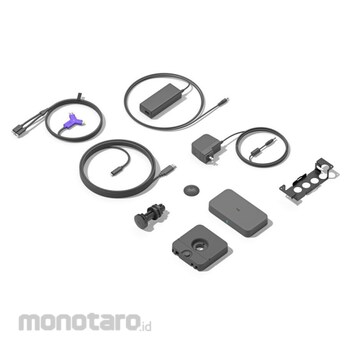

"SWYTCH" consists of a connector, a hub, and an extender, and is compatible with conference room solutions that use USB-connected conference cameras and HDMI-connected displays such as Microsoft Teams Rooms and Zoom Rooms.
With our unique DisplayLinkTM Plug and Play technology, you can use an HDMI-connected display by simply connecting the USB port of your laptop to a single cable.
You can also connect to USB-connected conference cameras, microphones, and speakers using the same cable, so you can share high-quality video and content without changing settings or changing cables.
Easily deploy touch-controlled meeting room solutions such as Microsoft Teams Rooms and Zoom Rooms, and support services that use other USB-connected meeting cameras and HDMI-connected displays.
With a USB 3.0 Type A and Type C integrated connector, you can use it with a single cable, whether it's a Windows laptop, MacBook or Chromebook.
For any video conferencing application, webinar service or streaming platform, you can use AV equipment in the conference room with a single cable, eliminating dongles, splitters and HDMI for neat wiring.
You can also clean up the wiring by attaching the connector to the attached magnet dock installed on the table or fixing the cable.
Logicool SWYTCH + video conferencing system
#Grup produk P113526301
Spesifikasi
| ROHS Directive (Corresponding to 10 Substances) | Correspondence |
|---|---|
| Type of Terminal Fitting | Swytch Hub + Logitech + PC mount compatible (not included). Swytch Extender - Install through the + 25mm grommet hole or under the table using the included installation hardware. Swytch Connector + Includes magnetic dock. |
Pilih jenis produk yang diinginkan
| Nomor SKU | Model Number | Masa Persiapan Barang | Harga | Jumlah |
|---|---|---|---|---|
| Loading... | ||||
Informasi Produk
Description
Feature
Specification[System requirements]
Ulasan Produk

Tidak ada ulasan


 Buka WhatsApp