





















































































































































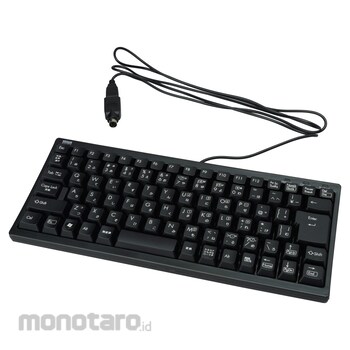

It is a compact keyboard that removes the numeric keypad and specializes only in character input.
The key pitch is the same as the standard keyboard. The 19mm key pitch uses laser printing with excellent durability of the characters. It is possible to stand the keyboard when it gets in the way.
With USB-PS / 2 connector. It can be used with either a USB connection or a PS / 2 connection.
The frequently used "ENTER" key has been enlarged.
With a groove to fix the cable, which is convenient for handling the cable.
SANWA SUPPLY Keyboard
#Grup produk P113494206

Spesifikasi
| Cable Length (m) | 1.5 |
|---|---|
| Connector Shape | USB (A type connector), PS / 2 combo type (mini DIN 6pin male) |
| Current Consumption (mA) | under 100 |
| Interface | USB, PS / 2 combo type |
| Key Type | Membrane |
| Key layout | Japanese |
| Key pitch (mm) | 19 |
| Key stroke (mm) | 3.8±0.3 |
| Material | ABS |
| Number of Keys | 86 keys |
| Operating Force | 55±10g |
| Printing Method | Laser printing |
| Supported OS | Windows 10, 8.1, 8, 7 |
| Type of Connection | Wired |
Pilih jenis produk yang diinginkan
| Nomor SKU | Model Number | Masa Persiapan Barang | Harga | Jumlah |
|---|---|---|---|---|
| Loading... | ||||
Informasi Produk
Description
Feature
SpecificationNo USB hub, no numeric keypad, no silence, no isolation, no touchpad, slim type: standard, keyboard size: compact (without numeric keypad), with angle adjustment [Other specifications] * For function keys on laptop computers and genuine keyboards of each manufacturer Pre-assigned special functions (screen brightness adjustment, volume up / down, etc.) cannot be operated from this keyboard. * Commands before Windows starts (BIOS settings, SCSI board settings, etc.) may not work depending on the PC itself. * When using this keyboard for the first time, depending on the model and BIOS of the personal computer, it may be necessary to connect the PS / 2 mouse or PS / 2 keyboard directly to the main unit before booting. * Depending on the computer model and BIOS, the USB keyboard may not be recognized after suspend mode (sleep mode, standby mode). In this case, pull out the connected USB connector and then reconnect it.
Ulasan Produk

Tidak ada ulasan


 Buka WhatsApp