





















































































































































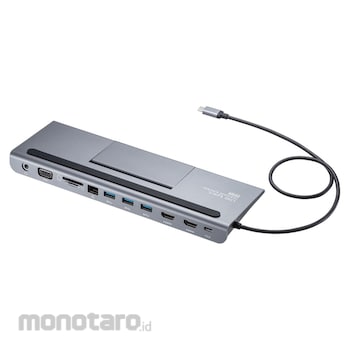

It is a USB Type-C docking station that allows up to 2 displays ( HDMI x 2 / VGA), various USB devices, SD / microSD card readers, wired LAN, and extended connection of USB audio with one USB Type-C cable. .. At home or in the office, you can comfortably operate with a large screen display and a USB device by connecting a single Type-C cable, and when you go out or have a meeting, you can quickly carry it by simply disconnecting one Type-C cable. Display expansion with USB Type-C connection Since it supports "DisplayPort Alternate Mode", you can easily realize a multi-display environment (mirror mode / extended mode) without installing software. When one display using HDMI is output, it supports up to 4K / 30Hz resolution. The VGA output supports resolutions up to 1920 x 1080 (60Hz). Up to 2 displays can be connected (HDMI + HDMI or HDMI + VGA). The maximum resolution when two units are connected supports up to 1920 x 1080 (60Hz) / each. It supports "USB Power Delivery (USB PD)" in USB Type-C and supports input up to 20V / 5A (100W). You can also charge the connected PC via this product. Equipped with an SD / microSD card reader, you can import photos and videos taken with a digital camera. Since it supports Gigabit Ethernet (1000BASE-T), it can also support Gigabit network environment, and you can connect to a wired LAN with a single USB Type-C cable. You can also connect a computer speaker / microphone (3.5mm stereo mini plug) and use it as a USB speaker / USB microphone. Since it can also be used as a notebook PC stand, it enables comfortable PC input and can be installed in a small space. It is also equipped with a simple smartphone stand function, and it is also possible to output the video of a smartphone that supports DisplayPort Alt mode compatible video output. * It is equipped with a USB Type-C port and can be used with a computer that supports DisplayPort Alternate Mode. * Up to 2 displays are supported, and 3 displays are not supported. * Please prepare a separate USB PD adapter when charging a USB PD compatible device or when using this product as a self-powered hub. * Operation is not guaranteed for all devices.
* Please connect this product directly to the USB 3.2 Type-C port of the PC. It cannot be used with a USB hub or an additional USB port.
* For output at 4K resolution, the display must support 4K resolution, and the output content must also support 4K resolution.
* This product is compatible with USB PD (Power Delivery), but not all USB 3.2 Type-C equipped devices (PD compatible).
* Regarding the removal and connection of this product, plug and play is basically supported, but in rare cases it may not be displayed / operated normally due to a timing error of USB recognition. Please try plugging and unplugging again. This is not a malfunction or malfunction of this product.
* This product is used while Windows OS / Mac OS is running. It does not work at system boot or on the BIOS screen. (Not displayed.)
* It may not operate normally even if it is a compatible model, compatible connected device / environment.
SANWA SUPPLY Docking Station
#Grup produk P113479289

Spesifikasi
| Access Method | CSMA/CD |
|---|---|
| Communication Protocol | Full duplex / half duplex |
| Connector Shape | HDMI, VGA (mini D-sub 15pin), USB3.2 Gen1 Type-C connector Male x 1 (upstream), USB3.2 Gen1 Type-C connector Female x 1 (PD3.0, charging only ), USB3.2 Gen1 A connector Female x 3 (downstream) |
| Function | Dual display output |
| Humidity Range (RH) | 5%~90% |
| Interface | USB specification Ver3.2 Gen1 (USB3.1 Gen1 / 3.0) compliant (USB Ver2.0 / 1.1 upward compatible) |
| Power Supply | Both bus power and self power support |
| Power Supply Voltage (V) | 5 |
| Set Contents | Instruction manual (warranty) x 1 |
| Standard | IEEE802.3(10BASE-T),IEEE802.3u(100BASE-TX ),IEEE802.3ab(1000BASE-T) |
| Suitable Models | A Windows-equipped (DOS / V) PC that is equipped with a USB 3.2 Type-C connector as standard and supports DisplayPort Alt mode, Apple Mac series |
| Supported OS | Windows 10, 8.1, 8, 7, macOS (BigSur) 11, macOS 10.12-10.15, OS X 10.8-10.11, Mac OS X 10.6 . 10.7 (OS update service pack in some cases) May need to be installed.) |
Pilih jenis produk yang diinginkan
| Nomor SKU | Model Number | Masa Persiapan Barang | Harga | Jumlah |
|---|---|---|---|---|
| Loading... | ||||
Informasi Produk
Description
Ulasan Produk

Tidak ada ulasan


 Buka WhatsApp