





















































































































































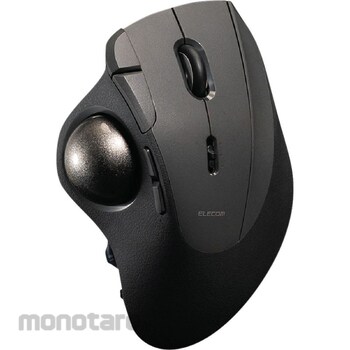

Maximum performance with minimal movement. The IST PRO is a high-grade 10-button model that maximizes the functionality of a thumb trackball. Its ergonomic design allows for a natural grip and a high-performance bearing support unit ensures smooth control. Its design minimizes strain even during extended use.
The IST PRO is a high-grade 10-button model that pushes the limits of functionality that can be incorporated into a thumb trackball.
The ergonomic design allows for natural gripping without gripping, making it comfortable to hold regardless of hand size or grip style.
The angle of the tilt puts no strain on your wrists, making it comfortable even when working for long periods of time.
The bearing support unit uses high-performance bearings manufactured by MinebeaMitsumi, which reduces friction and allows for smooth ball control, as if floating in the air.
Since it does not rub against the ball surface, dirt is less likely to collect on the support unit, allowing for long-term maintenance-free use.
The support unit can be easily removed and replaced with bearings or even synthetic rubies.
*Replacement bearing unit (M-BS10) and artificial ruby unit (M-RS10) are sold separately.
The ball can be easily removed and replaced through the hole on the back, making it easy to maintain the ball and internal support unit.
The large 36mm ball fits comfortably under your thumb, allowing you to move the pointer over a wide area with precision with a single touch.
*Replacement ball (M-B10SV) is sold separately.
It has 10 buttons: left, right, middle, forward, back, three function buttons, and a tilt wheel. The function button next to the right button allows you to use your right ring finger for actions.
The tilt wheel allows you to scroll horizontally by simply tilting the screen. You can scroll up, down, left, and right using just the wheel, greatly improving your work efficiency when using Excel or a web browser.
By using the dedicated setting software "ELECOM Mouse Assistant," you can assign your favorite functions to each of the 10 buttons, allowing you to perform a variety of operations with your right hand by combining movements in any direction in an infinite number of ways.
You can save up to three profiles to the trackball itself, and the function assignments are retained even when you switch connected devices.
It supports Bluetooth wireless, USB 2.4GHz wireless, and wired USB connections. It is compatible with a wide range of operating systems, including Windows and Mac, as well as Chromebooks, iPads, iPhones, and Android tablets.
You can register up to six connected devices, such as computers, tablets, and smartphones, and freely combine connection methods to suit your environment and connected devices.
*The breakdown of the six devices is as follows: two with Bluetooth connection, one with USB 2.4GHz wireless connection, one with USB wired connection, and two with custom connection.
*For custom connections, you can choose between Bluetooth or USB 2.4GHz wireless connection using the "ELECOM Mouse Assistant." The default setting is Bluetooth connection.
*To use a custom connection with a USB 2.4GHz wireless connection, you will need to purchase the separately sold ELECOM Bridge G1000 USB receiver and configure it using the ELECOM Mouse Assistant.
The connection switching dial is located on the side of the trackball, allowing you to easily switch connections without taking your hands off the device. (Patent pending)
*When adding a USB 2.4GHz wireless connection, you will need to purchase the separately sold ELECOM Bridge G1000 USB receiver and configure it using the ELECOM Mouse Assistant.
You can choose from three pointer speed settings: Low, Mid, and High. The default settings are 500, 1000, and 1500 DPI. You can also change the setting in 100 DPI increments from 100 to 12,000 DPI using the ELECOM Mouse Assistant.
Equipped with ELECOM Bridge G1000 wireless technology, the PixArt PAW3311DB gaming sensor and high-grade MCU support a maximum report rate of 1000Hz, delivering communication and tracking performance that is durable enough for gaming.
The left and right buttons use silent switches developed by Panasonic Corporation, achieving high quietness without compromising on click feeling or durability.
The keyboard also uses silent switches for all buttons, so you can use it without worrying about disturbing others, whether you're using your computer during a meeting or working from home early in the morning or at night.
The receiver can be stored inside the device, making it less likely to get lost and convenient to carry around.
The power switch is located on the side of the device, allowing you to turn it on and off smoothly without turning it over, preventing battery drain when not in use.
It can be used with three power sources: a wired USB connection, easily replaceable batteries, or a rechargeable battery pack (sold separately).
*This product does not come with a battery pack. Please use a battery pack sold separately.
*Commercially available nickel-metal hydride rechargeable batteries cannot be used.
When connected via Bluetooth, it is equipped with a function that allows you to check the remaining battery level from your computer.
It is equipped with an indicator that displays the status of the connection destination and when it is time to replace the battery.
A USB Type-C(TM) to USB-A cable is included for wired connection.
These products meet one or more of our company's environmental certification standards and bear the "THINK ECOLOGY" mark.
As part of our efforts to reduce waste, this product comes with paperless instruction manuals and other materials.
As part of our commitment to environmental conservation, this product uses plastic in its packaging that is 20% lighter than our company's standard.
ELECOM IST PRO Trackball Mouse [Wired/Wireless/Bluetooth] Quiet Bearings, 10 Buttons, Tilt Wheel, 2-Year Warranty
#Grup produk P113425020

Spesifikasi
| Ball Diameter (mm) | Diameter approx. 36 |
|---|---|
| Battery Life | Up to about 18 months (approximate when using alkaline batteries) * May vary depending on usage conditions. |
| Bluetooth | Bluetooth 5.3 Class2 |
| Cable Length (m) | About 1.5 |
| Color | Black |
| Communication Protocol | GFSK method |
| Compatible Profile | HOGP(HID Over GATT Profile) |
| Connector Shape | [1] Receiver: USB-A plug, 2: Trackball body: USB Type-C(TM) port |
| Frequency Band | 2.4GHz band |
| Mass (g) | Approx. 158 *Battery not included, (Receiver) Approx. 2 |
| Number of Buttons | 10 *including wheel button and tilt wheel |
| Number of Wheels | 1 piece |
| Outer Dimensions (mm) | Width 94 x Depth 136 x Height 56, (Receiver) 16 x 19 x 9 |
| Power Supply | Two AA alkaline or manganese batteries, USB bus power, or rechargeable lithium-ion battery (sold separately: M-BP10 battery pack) |
| Reading method | IR LED |
| Resolution (dpi) | Sensor: 500/1000/1500 *Can be set to any value between 100 and 12,000 using the dedicated software \"ELECOM Mouse Assistant.\" |
| Set Contents | Trackball unit x 1, ELECOM Bridge G1000 USB receiver x 1, AA alkaline batteries for operation check x 2, removal tool x 1, wired connection cable [USB Type-C to USB-A cable (approx. 1.5m)] x 1 |
| Suitable Models | Windows OS, Android, macOS, iOS, iPad OS, Chrome OS devices that support Bluetooth HOGP, and Windows OS, macOS, Chrome OS devices with a USB port |
| Supported OS | (iOS) iOS 17, (Android) Android 14, (Windows) Windows 11/10, (iPadOS) iPadOS 17, (macOS) macOS Sonoma 14, (Other) ChromeOS |
| Type | Support ball bearing |
| Type of Connection | Bluetooth(R) wireless, USB2.4GHz wireless, USB wired |
Pilih jenis produk yang diinginkan
| Nomor SKU | Model Number | Masa Persiapan Barang | Harga | Jumlah |
|---|---|---|---|---|
| Loading... | ||||
Informasi Produk
Description
Feature
Specification*VCCI: Class B compliant *Receiver storage: Yes *Report rate: Max. 1000Hz
Ulasan Produk

Tidak ada ulasan


 Buka WhatsApp