





















































































































































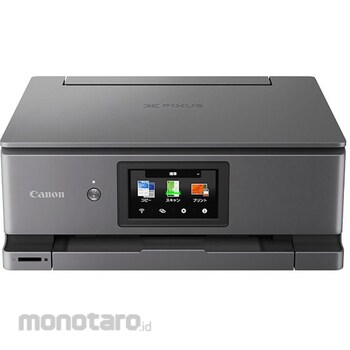

A premium, high-spec model that offers high-quality photos at low cost and comes with a home screen that is convenient for printing photos.
[High-quality photo quality, premium 6-color hybrid ink]
The color gamut on glossy paper has been further expanded. Furthermore, the photo blue ink reduces graininess, enabling even more detailed images. Furthermore, the high-density printhead technology "FINE" has been incorporated to achieve faster and more beautiful printing.
[Photo printing made easier with low running costs]
One L-size photo costs about 11.1 yen. Recommended for those who print a lot of photos.
[Print L-size photos in about 10 seconds!]
This has made it possible to further increase the speed of photo printing without compromising print quality.
[Enjoy a variety of prints from your smartphone at home with Smartphone Print]
"QR Code Direct Connection" is available, allowing you to connect simply by scanning a QR code. You can print not only photos from your smartphone, but also various other things, including social media posts. There are many ways to enjoy it depending on how you use it.
[Quick access to functions, Switch UI]
In addition to a photo UI specialized for photo printing, the UI can be customized for each situation, such as work, study, hobbies, etc. The 4.3-inch touch panel is easy to see, use, and press, making operation comfortable.
[Convenient features]
It is equipped with convenient functions such as 2-way paper feeding that can be selected depending on the location and purpose, automatic double-sided printing that allows you to print both the front and back of the paper at the same time, ``automatic paper width detection'' that detects the size of the paper simply by setting it, ``barcode mode'' that is convenient for printing various barcodes, and direct printing.
[Wi-Fi 5GHz compatible & automatic power on]
When you send a print command from your smartphone or computer, the printer automatically turns on using high-speed 5GHz communication. The output tray automatically opens and the printer starts printing. It also supports printing from the cloud. The output tray automatically retracts.
[Printer linkage service MyPrint With]
By linking your printer to your Canon ID, you can extend the manufacturer's free warranty by one year, and we also offer a variety of support options to help you continue using your printer with peace of mind.
*For details on measurement documents and measurement methods, please check the manufacturer's support website.
*The default setting for the automatic power-on function is "off." Please change this setting from the device settings.
Canon Printer Inkjet MultifunctionXK510
#Grup produk P113221725

Spesifikasi
| Feeding Method | Rear tray / cassette |
|---|---|
| Included Accessories | Setup ink tank (XKI-N21C / N21M / N21Y / N21BK / N21PB / N20PGBK), setup CD-ROM (included only for Windows. For Mac, other software is provided only via the Internet), installation and basic operation Manual (paper), multi-tray |
| Ink | Premium 6-color hybrid (independent) |
| Interface | (For PC) IEEE802.11n/IEEE802.11/IEEE802.11b/IEEE802.11a/IEEE802.11ac, Hi-Speed USB *The PC must support Hi-Speed USB |
| LCD monitor | 4.3-inch (touch panel) |
| Mass (kg) | Approximately 6.6 (including print head and ink tank) |
| Maximum Resolution | 4800 (horizontal) x 1200 (vertical) dpi |
| Number of Nozzle | 6656 (print head) |
| Outer Dimensions, Width W x Depth D x Height H (mm) | (approx.) 372x345x142 |
| ROHS Directive (Corresponding to 10 Substances) | Correspondence |
Pilih jenis produk yang diinginkan
| Nomor SKU | Model Number | Masa Persiapan Barang | Harga | Jumlah |
|---|---|---|---|---|
| Loading... | ||||
Informasi Produk
Description
Ulasan Produk

Tidak ada ulasan


 Buka WhatsApp